
Aadhaar OTP Not Received: Reasons and Solutions to Fix OTP Problem
Many Aadhaar services require verification through a One Time Password (OTP) sent to the mobile number registered with Aadhaar. OTP authentication is used when downloading Aadhaar, updating Aadhaar details, checking Aadhaar status, or accessing several UIDAI services online.
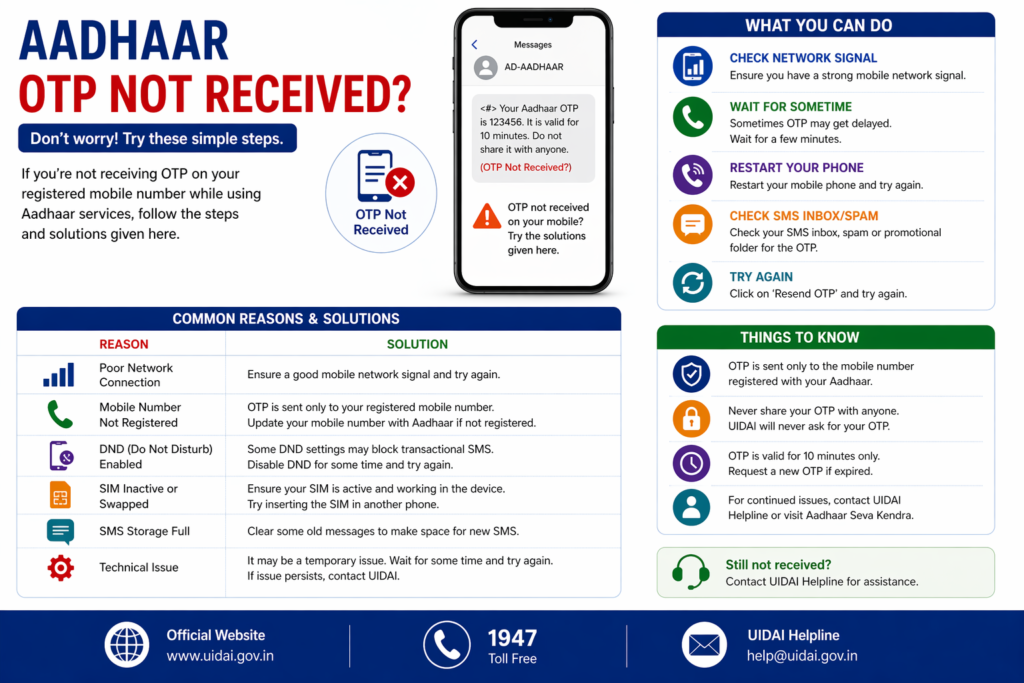
Sometimes users may face a situation where the OTP is not received on their mobile phone even after entering the Aadhaar number correctly on the UIDAI website. This can create confusion and prevent residents from completing Aadhaar-related tasks.
There can be several reasons why the Aadhaar OTP is not received. In most cases the problem can be resolved by checking the mobile number linked with Aadhaar, network connectivity, or certain device settings.
This guide explains the common reasons why Aadhaar OTP is not received and provides practical solutions to resolve the issue.
What is Aadhaar OTP
OTP stands for One Time Password. It is a temporary verification code generated by the Aadhaar system and sent to the mobile number registered with Aadhaar.
The OTP helps confirm that the person accessing the Aadhaar service is the legitimate Aadhaar holder.
OTP verification is used for many Aadhaar services including:
- Downloading Aadhaar card
- Updating Aadhaar details
- Generating Virtual ID
- Locking or unlocking Aadhaar biometrics
- Accessing Aadhaar services through the UIDAI portal
The OTP is usually valid only for a short time and must be entered quickly to complete the verification process.
Why Aadhaar OTP is Important
OTP authentication plays an important role in protecting Aadhaar information. Because Aadhaar contains sensitive identity details, UIDAI uses OTP verification to ensure that only the Aadhaar holder can access their information.
Without OTP verification, Aadhaar services would be vulnerable to misuse.
OTP provides several benefits.
Identity Verification
It confirms that the person using the Aadhaar service has access to the registered mobile number.
Security Protection
OTP prevents unauthorized users from accessing Aadhaar details.
Safe Online Access
It allows Aadhaar services to be accessed securely through the internet.
Because of these reasons, OTP verification is required for many Aadhaar services.
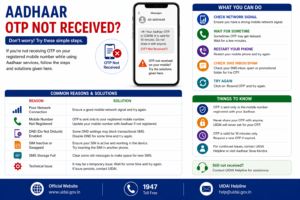
Common Reasons Aadhaar OTP Is Not Received
There are several possible reasons why the Aadhaar OTP may not reach your mobile device.
Understanding these reasons can help resolve the problem quickly.
Mobile Number Not Registered with Aadhaar
One of the most common reasons for OTP issues is that the mobile number is not registered with the Aadhaar record.
If a mobile number was never linked during Aadhaar enrollment, the system cannot send OTP messages.
In such cases, residents must visit an Aadhaar enrollment center to update their mobile number.
Incorrect Mobile Number Linked with Aadhaar
Sometimes the mobile number registered with Aadhaar may be outdated or incorrect.
If the Aadhaar record contains an old mobile number that is no longer active, OTP messages will be sent to that number instead of the current phone.
Updating the mobile number at an Aadhaar center usually solves this issue.
Network Connectivity Issues
Poor network connectivity can also prevent OTP messages from reaching the mobile phone.
If the phone has weak signal strength or limited network coverage, SMS messages may be delayed.
Moving to an area with stronger network reception may help receive the OTP.
SMS Blocking or DND Settings
Some mobile devices or telecom services block promotional or automated messages through Do Not Disturb (DND) settings.
Although Aadhaar OTP messages are usually delivered even with DND enabled, certain device settings or apps may still block incoming SMS messages.
Checking phone settings and ensuring that SMS messages are not blocked can help resolve the problem.
Temporary Server Delay
In some cases the OTP may not arrive immediately due to temporary delays in the messaging system.
High traffic on the UIDAI portal or telecom network issues may cause delays in sending OTP messages.
Waiting for a few minutes and requesting a new OTP usually resolves the issue.
Incorrect Aadhaar Details Entered
If incorrect Aadhaar number or captcha code is entered while requesting OTP, the system may fail to process the request.
Always ensure that the Aadhaar number is entered correctly before requesting the OTP.
Steps to Fix Aadhaar OTP Not Received Issue
If you are not receiving the Aadhaar OTP, you can try several troubleshooting steps.
Check Mobile Network
Ensure that your mobile phone has a stable network signal and is able to receive SMS messages.
Verify Registered Mobile Number
Confirm that the mobile number linked with Aadhaar is correct and active.
Wait and Retry
If OTP does not arrive immediately, wait for a few minutes and request a new OTP.
Restart Mobile Device
Restarting the mobile phone sometimes resolves SMS delivery issues.
Disable SMS Blocking Apps
If any apps or settings are blocking SMS messages, temporarily disable them.
These simple steps often help resolve OTP delivery issues.
How to Update Mobile Number in Aadhaar
If the OTP problem occurs because the mobile number linked with Aadhaar is incorrect or inactive, updating the mobile number is the best solution.
Updating the mobile number requires visiting an Aadhaar enrollment center.
The process usually includes the following steps:
- Visit the nearest Aadhaar enrollment center.
- Fill out the Aadhaar update form.
- Provide the new mobile number.
- Complete biometric verification.
- Receive acknowledgement receipt.
Once the mobile number update is processed, OTP messages will be sent to the new mobile number.
When to Contact Aadhaar Support
If the OTP issue continues even after checking mobile network and retrying the request, residents may contact Aadhaar support.
UIDAI provides customer support through its helpline and website.
Support representatives can guide users through troubleshooting steps or provide information about the issue.
Contacting Aadhaar support may help resolve technical issues related to OTP delivery.
Tips to Avoid OTP Issues in Future
Residents can avoid OTP problems by following a few simple practices.
Ensure that the mobile number linked with Aadhaar is always active. If the mobile number changes, update it at an Aadhaar enrollment center.
Keep the phone network active when using Aadhaar services online. Avoid blocking SMS messages from unknown numbers if Aadhaar services are being used.
These precautions help ensure that OTP verification works smoothly.
Related Aadhaar Services
After resolving OTP issues, residents can continue using Aadhaar services such as:
- Download Aadhaar card
- Check Aadhaar update status
- Update Aadhaar details
- Order PVC Aadhaar card
- Lock or unlock Aadhaar biometrics
These services allow residents to manage Aadhaar information securely.
Frequently Asked Questions
Why am I not receiving Aadhaar OTP
OTP may not be received due to network issues, incorrect mobile number, or unregistered mobile number.
Can Aadhaar OTP be sent to any mobile number
No, OTP is sent only to the mobile number registered with Aadhaar.
What should I do if my mobile number changed
You should visit an Aadhaar enrollment center to update your mobile number.
How long does Aadhaar OTP take to arrive
OTP usually arrives within a few seconds but may sometimes be delayed due to network issues.
Conclusion
OTP verification is an important security feature used by Aadhaar services to protect personal identity information. Although OTP delivery problems may occasionally occur, they are usually caused by simple issues such as incorrect mobile number, network connectivity problems, or temporary delays.
By checking the registered mobile number, ensuring proper network connectivity, and updating Aadhaar details when required, residents can resolve most OTP issues quickly. Keeping Aadhaar information updated and maintaining access to the registered mobile number ensures that Aadhaar services remain secure and accessible whenever needed.
Disclaimer: The Aadhaar-related information provided on this website is for general informational purposes only. For official updates, services, and verified details, please visit the UIDAI official website.