
Aadhaar Update Status: How to Check Aadhaar Update Request Status Online
Sometimes Aadhaar holders need to update personal details such as address, name, date of birth, or mobile number. After submitting an update request through the UIDAI portal or at an Aadhaar enrollment center, many residents want to know whether the update has been processed successfully.
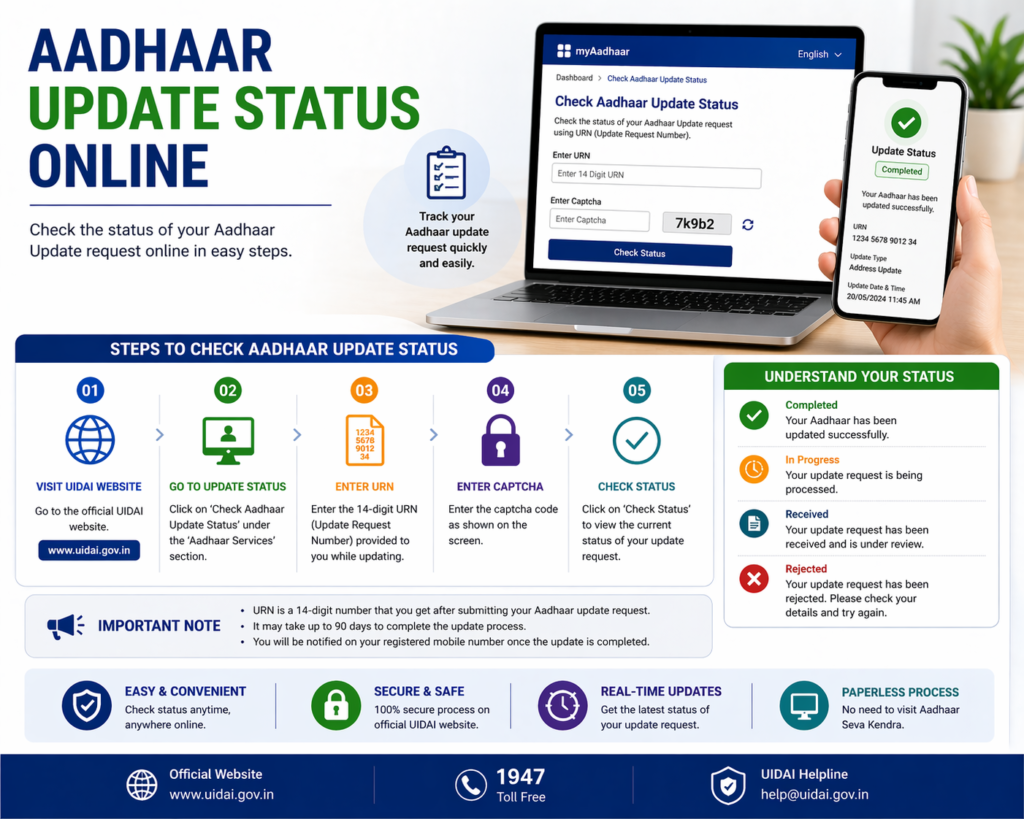
To make this process easier, the Unique Identification Authority of India (UIDAI) provides a facility that allows residents to check the Aadhaar update status online. This helps users track the progress of their request and know whether the changes have been approved or are still under verification.
Checking the Aadhaar update status is a simple process that only requires the Update Request Number (URN) provided during the update submission.
This guide explains how to check Aadhaar update status, what information is required, and what the different update status messages mean.
What is Aadhaar Update Status
Aadhaar update status refers to the current progress of a request submitted to modify information in the Aadhaar database.
Whenever a resident submits a request to update Aadhaar details, UIDAI verifies the information and supporting documents before approving the changes.
During this process, the system generates a unique Update Request Number (URN). This number acts as a tracking reference that allows residents to check whether the update request has been processed or is still pending.
Tracking the update status helps residents stay informed about the progress of their request.
When You Need to Check Aadhaar Update Status
Residents may need to check Aadhaar update status in several situations.
For example, after submitting a request to change the address, correct the name, update the mobile number, or modify the date of birth, it may take some time for UIDAI to verify the request.
During this time, checking the update status helps confirm whether the update has been approved or if additional action is required.
Tracking the update status is also useful when residents want to download the updated e-Aadhaar once the request has been processed successfully.
Information Required to Check Aadhaar Update Status
To check Aadhaar update status, residents must have the Update Request Number (URN).
The URN is provided after submitting the Aadhaar update request. It is usually printed on the acknowledgement receipt issued by the Aadhaar enrollment center or displayed on the screen when the update request is submitted online.
The URN helps UIDAI identify the specific update request associated with the Aadhaar number.
Residents should keep the acknowledgement receipt safe until the update process is completed.
Steps to Check Aadhaar Update Status Online
UIDAI allows residents to check Aadhaar update status through its official website.
The process is straightforward and can be completed within a few minutes.
Step 1: Visit the UIDAI Website
Open the official UIDAI website using a secure internet connection.
Step 2: Go to Aadhaar Update Status Section
Navigate to the section where residents can check the status of Aadhaar update requests.
Step 3: Enter Update Request Number
Enter the Update Request Number provided during the update submission.
Step 4: Enter Security Code
Enter the captcha code displayed on the screen to proceed.
Step 5: Submit the Request
After submitting the details, the system will display the current status of the Aadhaar update request.
Understanding Aadhaar Update Status Messages
When checking Aadhaar update status, residents may see different messages depending on the stage of the process.
Some common status messages include:
Update Request Under Review
This message indicates that UIDAI is currently verifying the documents and information submitted during the update request.
Update Request Approved
This status means the update has been successfully verified and the changes have been applied to the Aadhaar record.
Update Request Rejected
Sometimes the update request may be rejected due to incorrect information or invalid documents. In such cases, the resident may need to submit a new request.
Understanding these messages helps residents know the next steps they should take.
How Long Aadhaar Update Takes
The time required to process Aadhaar updates may vary depending on the type of update and the verification required.
In many cases, Aadhaar updates may take a few days to process, although the exact processing time may vary.
Residents can periodically check the update status until the request is completed.
Once the update is approved, the resident can download the updated e-Aadhaar.
What to Do After Aadhaar Update is Approved
Once the Aadhaar update request is approved, the updated information becomes part of the Aadhaar database.
Residents can then download the latest version of the Aadhaar card from the UIDAI portal.
The updated Aadhaar card will reflect the corrected information such as the new address, updated mobile number, or corrected name.
Keeping a copy of the updated e-Aadhaar ensures that the correct information is available for future use.
Common Problems While Checking Update Status
Although checking Aadhaar update status is simple, some users may face certain issues.
Incorrect Update Request Number
Entering an incorrect URN may prevent the system from retrieving the update information.
Captcha Code Error
If the captcha code is entered incorrectly, the system may not process the request.
Update Not Yet Processed
If the update request has just been submitted, it may take some time before the system shows the updated status.
Ensuring that the correct details are entered usually resolves these issues.
Tips for Aadhaar Update Tracking
Residents can make tracking easier by keeping the acknowledgement receipt safe after submitting the update request.
Checking the status periodically helps confirm whether the update has been processed successfully.
Once the update is approved, downloading the updated Aadhaar card ensures that the corrected information is available whenever needed.
Related Aadhaar Services
After checking the update status, residents may also access other Aadhaar services such as:
- Download Aadhaar card
- Check Aadhaar card status
- Update Aadhaar address
- Order PVC Aadhaar card
- Lock or unlock Aadhaar biometrics
These services help residents manage their Aadhaar identity efficiently.
Frequently Asked Questions
How can I check Aadhaar update status
You can check Aadhaar update status online using the Update Request Number provided after submitting the update request.
What is Update Request Number
The Update Request Number is a reference number used to track Aadhaar update requests.
Can I download Aadhaar after update is approved
Yes, once the update is approved you can download the updated e-Aadhaar from the UIDAI portal.
What if Aadhaar update request is rejected
If the update request is rejected, you may need to submit a new request with correct documents.
Conclusion
Checking Aadhaar update status helps residents track the progress of their Aadhaar update requests and confirm whether the changes have been successfully applied. UIDAI provides a simple online system that allows residents to check the status using the Update Request Number.
By monitoring the update status and downloading the updated Aadhaar card once the request is approved, residents can ensure that their Aadhaar information remains accurate and ready for use in various services.
Disclaimer: The Aadhaar-related information provided on this website is for general informational purposes only. For official updates, services, and verified details, please visit the UIDAI official website.