Aadhaar Card Lost : What to Do if Aadhaar Card is Lost or Misplaced
The Aadhaar card is one of the most important identity documents used by residents of India. It is required for many services such as banking, government schemes, mobile verification, and identity authentication. Because Aadhaar is widely used in everyday processes, losing the Aadhaar card can create inconvenience.
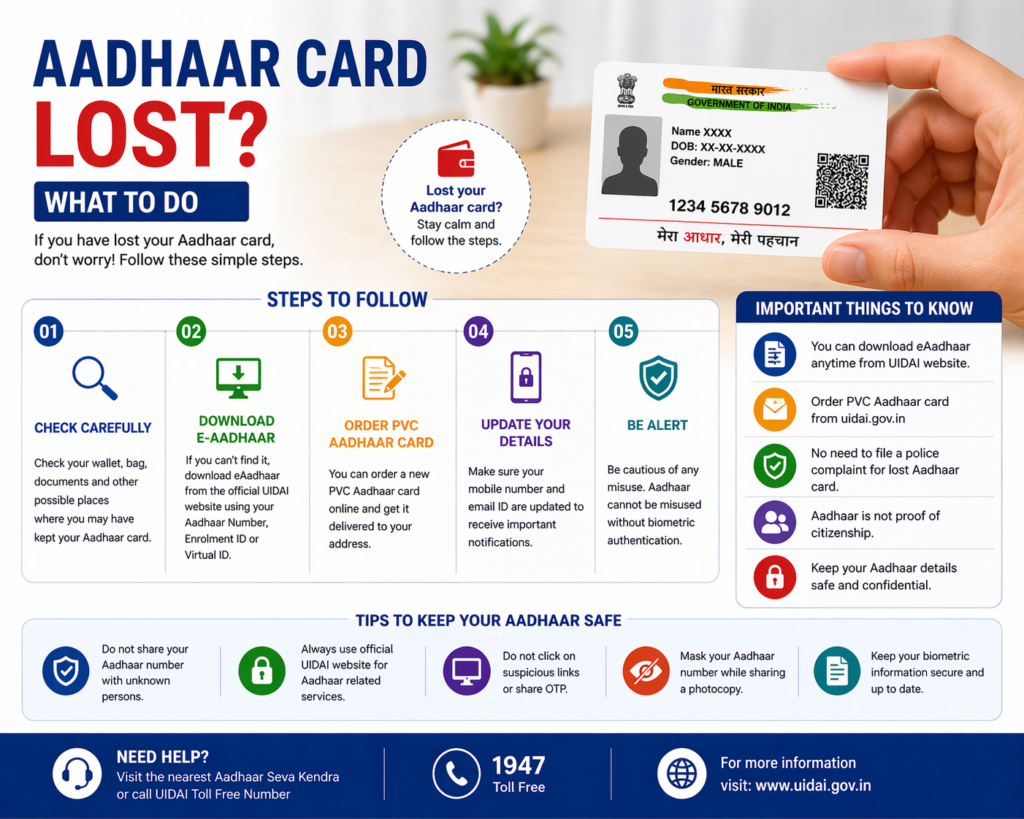
However, if your Aadhaar card is lost or misplaced, there is no need to panic. The Aadhaar system maintained by the Unique Identification Authority of India (UIDAI) allows residents to easily retrieve or download their Aadhaar card again.
Since Aadhaar information is stored digitally in the UIDAI database, residents can access their Aadhaar details online and download the e-Aadhaar, which is the digital version of the Aadhaar card.
This guide explains what to do if your Aadhaar card is lost, how to recover Aadhaar details, and the different ways to obtain a new copy of the Aadhaar card.
What Happens If Aadhaar Card Is Lost
Losing the physical Aadhaar card does not mean that your Aadhaar identity is lost. The Aadhaar number and related information remain securely stored in the UIDAI database.
Even if the printed Aadhaar card is lost, residents can still access their Aadhaar details using their Aadhaar number, Enrollment ID, or Virtual ID.
Because Aadhaar information is digitally maintained, it is possible to download the Aadhaar card again at any time.
Residents can obtain a new copy of Aadhaar through several methods, including downloading e-Aadhaar, ordering a PVC Aadhaar card, or retrieving Aadhaar details through UIDAI services.
Ways to Recover Lost Aadhaar Card
If your Aadhaar card is lost or misplaced, there are several ways to retrieve it.
The method you choose may depend on whether you remember your Aadhaar number or still have the Enrollment ID from the enrollment receipt.
Method 1: Download e-Aadhaar Online
One of the easiest ways to recover a lost Aadhaar card is to download the e-Aadhaar from the UIDAI website.
The e-Aadhaar is the digital version of the Aadhaar card and contains the same details as the printed card.
The steps usually include:
- Visit the official UIDAI website.
- Navigate to the Aadhaar download section.
- Enter your Aadhaar number, Enrollment ID, or Virtual ID.
- Enter the captcha code displayed on the screen.
- Verify using OTP sent to the registered mobile number.
- Download the Aadhaar PDF file.
Once downloaded, the e-Aadhaar can be printed and used as identity proof.
Method 2: Retrieve Aadhaar Number or Enrollment ID
If you have lost the Aadhaar card and do not remember your Aadhaar number, UIDAI provides a facility to retrieve Aadhaar details.
Residents can recover their Aadhaar number or Enrollment ID through the UIDAI portal.
The process usually requires:
- Name of the Aadhaar holder
- Registered mobile number or email address
- OTP verification
After successful verification, the Aadhaar number or Enrollment ID will be sent to the registered contact details.
Once you retrieve the Aadhaar number, you can download the Aadhaar card easily.
Method 3: Order Aadhaar PVC Card
Residents who prefer a physical Aadhaar card can request a PVC Aadhaar card from UIDAI.
The PVC Aadhaar card is a durable, wallet-sized card printed on plastic material. It contains security features such as hologram and secure QR code.
After placing the request, the PVC Aadhaar card is printed and delivered to the address stored in the Aadhaar database.
This option is convenient for residents who want a durable Aadhaar card for everyday use.
Method 4: Visit Aadhaar Enrollment Center
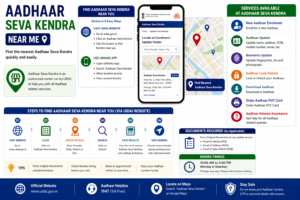
If you cannot retrieve your Aadhaar details online, you can visit the nearest Aadhaar enrollment center or Aadhaar Seva Kendra.
At the center, Aadhaar operators can verify your identity through biometric authentication such as fingerprints or iris scan.
Once the identity is verified, the operator can help you retrieve Aadhaar details or access your Aadhaar card.
Visiting an Aadhaar center is especially helpful if the registered mobile number linked with Aadhaar is not accessible.
Is e-Aadhaar Valid as Aadhaar Card
Yes, the e-Aadhaar downloaded from the UIDAI portal is legally valid.
The digital Aadhaar document is digitally signed by UIDAI and contains the same information as the physical Aadhaar card.
It can be used for many purposes including:
- Identity verification
- Address proof
- Government services
- Banking processes
Many organizations accept e-Aadhaar as a valid identity document.
How to Print Lost Aadhaar Card
Once the e-Aadhaar is downloaded successfully, residents can print the Aadhaar card if needed.
The steps are simple:
- Open the downloaded Aadhaar PDF file.
- Enter the Aadhaar PDF password to unlock the file.
- Click the print option in the PDF reader.
- Print the document on paper.
The printed Aadhaar copy is generally accepted for identity verification purposes.
Aadhaar PDF Password
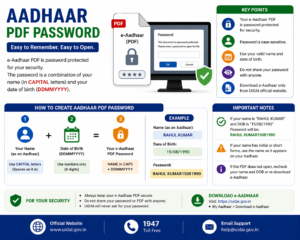
The downloaded Aadhaar PDF file is protected with a password.
The password format is:
First four letters of your name in capital letters + year of birth
For example:
If the name is Rahul Verma and the birth year is 1990, the password will be:
RAHU1990
Entering this password allows you to open the Aadhaar PDF file.
Security Tips If Aadhaar Card Is Lost
Although losing the Aadhaar card is not usually a serious problem, residents should take certain precautions.
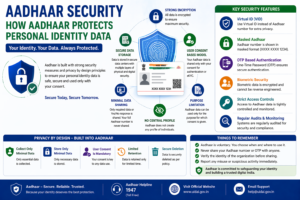
Avoid sharing Aadhaar details with unknown individuals. If you suspect misuse of Aadhaar information, you can use UIDAI security features such as locking Aadhaar biometrics.
Locking biometrics prevents unauthorized biometric authentication using your Aadhaar information.
You can unlock the biometrics later whenever authentication is required.
Keeping Aadhaar information secure helps protect personal identity.
Advantages of Digital Aadhaar
The Aadhaar system allows residents to access Aadhaar information digitally, which offers several advantages.
Easy Recovery
Even if the physical card is lost, Aadhaar details can be downloaded online.
Secure Storage
Aadhaar information is stored safely in the UIDAI database.
Convenient Access
Residents can download the Aadhaar card anytime from the UIDAI portal.
Valid Digital Identity
The e-Aadhaar is accepted as a valid identity document.
Because of these benefits, losing the physical Aadhaar card does not cause permanent problems.
Common Problems While Recovering Aadhaar
Some residents may face difficulties when trying to retrieve their Aadhaar card.
Registered Mobile Number Not Available
OTP verification requires access to the registered mobile number.
Aadhaar Number Not Remembered
If the Aadhaar number is forgotten, residents must retrieve it through UIDAI services.
Network Issues
Poor internet connectivity may interrupt the download process.
In most cases, these issues can be resolved by visiting an Aadhaar enrollment center.
Related Aadhaar Services
After recovering the Aadhaar card, residents can use several Aadhaar services including:
- Download Aadhaar card
- Check Aadhaar update status
- Update Aadhaar details
- Order PVC Aadhaar card
- Lock or unlock Aadhaar biometrics
These services help residents manage their Aadhaar identity conveniently.
Frequently Asked Questions
What should I do if my Aadhaar card is lost
You can download the e-Aadhaar from the UIDAI website or order a new PVC Aadhaar card.
Can I retrieve Aadhaar without Aadhaar number
Yes, you can retrieve Aadhaar number using your registered mobile number or email address.
Is e-Aadhaar valid if original card is lost
Yes, e-Aadhaar is legally valid and can be used for identity verification.
Can I get a duplicate Aadhaar card
Yes, you can download e-Aadhaar or request a PVC Aadhaar card.
Conclusion
Losing the Aadhaar card can be inconvenient, but it does not mean that your Aadhaar identity is lost. Because Aadhaar information is stored securely in the UIDAI system, residents can easily recover their Aadhaar card by downloading the e-Aadhaar or ordering a new PVC Aadhaar card. By using UIDAI services to retrieve Aadhaar details and keeping Aadhaar information secure, residents can continue using Aadhaar for identity verification and other important services without difficulty.
Disclaimer: The Aadhaar-related information provided on this website is for general informational purposes only. For official updates, services, and verified details, please visit the UIDAI official website.