

After applying for Aadhaar or requesting an update to Aadhaar details, many residents want to know whether their Aadhaar card has been generated or whether the update request has been processed. To make this process convenient, the Unique Identification Authority of India (UIDAI) provides an online facility that allows individuals to check their Aadhaar status quickly.
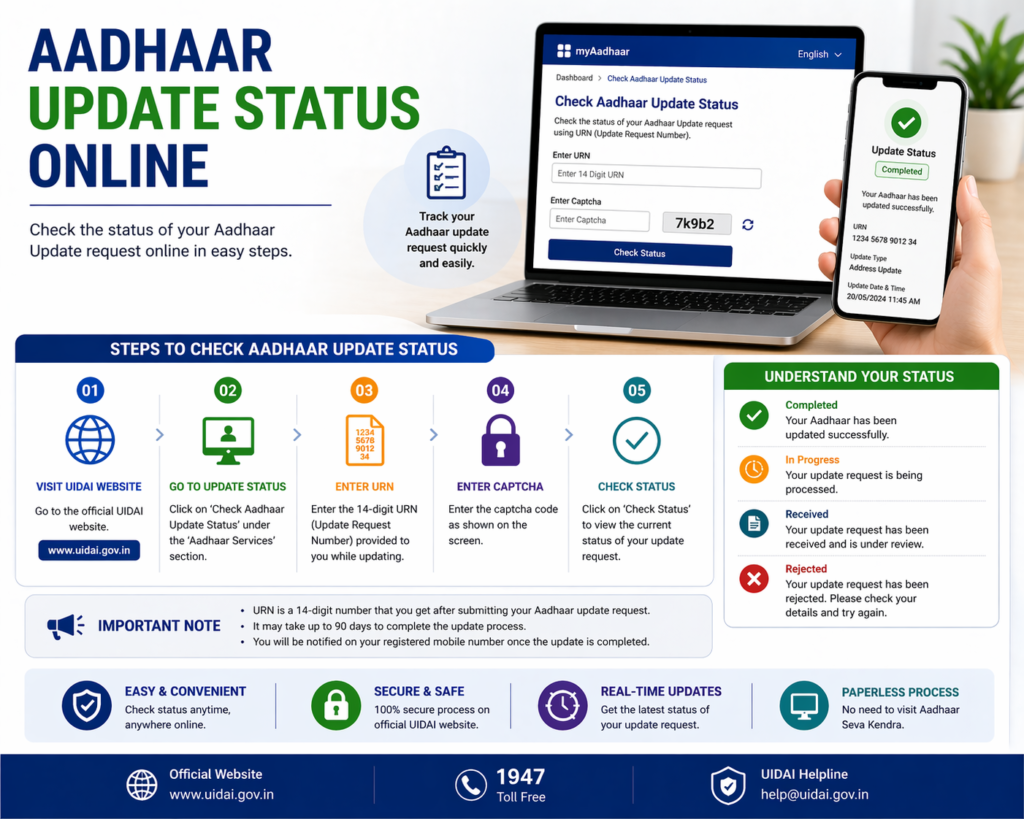
Checking Aadhaar status online helps residents confirm whether their Aadhaar number has been issued, whether their update request has been approved, or whether the Aadhaar card has been dispatched. This process only takes a few minutes and can be done using details such as the Enrollment ID or Update Request Number.
This guide explains how to check Aadhaar card status online, the information required to track Aadhaar status, and the steps residents should follow if their Aadhaar card has not yet been generated.
What is Aadhaar Status
Aadhaar status refers to the current progress of an Aadhaar application or update request. Whenever a person enrolls for Aadhaar or requests a change in their Aadhaar details, UIDAI processes the information before generating or updating the Aadhaar record.
During this process, the system assigns a reference number which can be used to track the progress of the application.
Checking Aadhaar status helps residents understand whether:
- Aadhaar has been generated
- Aadhaar update request has been approved
- Aadhaar update request is under review
- Aadhaar card has been dispatched
This tracking system provides transparency and helps users know when their Aadhaar will be ready for use.
When You Need to Check Aadhaar Status
Residents may need to check Aadhaar status in several situations.
One common scenario is after completing the Aadhaar enrollment process. Once the biometric and demographic details are submitted at the enrollment center, UIDAI verifies the information before generating the Aadhaar number. During this period, the applicant may want to track the status of the application.
Another situation arises when residents request updates to their Aadhaar details such as address, name, or mobile number. After submitting the update request, it may take a few days for the changes to be verified and processed.
Checking Aadhaar status helps confirm whether the update request has been completed successfully.
Residents may also check Aadhaar status when they have ordered a PVC Aadhaar card or requested a reprint of their Aadhaar card.
Information Required to Check Aadhaar Status
Before checking Aadhaar status, residents should keep certain details ready. These details are used by the UIDAI system to identify the application or update request.
The most common details required are:
Enrollment ID (EID)
The Enrollment ID is provided on the acknowledgement slip issued at the time of Aadhaar enrolment. It usually contains a 14-digit number along with the date and time of enrollment.
Update Request Number (URN)
If a person has requested a change in Aadhaar details, the update receipt will contain an Update Request Number. This number can be used to track the status of the update request.
Aadhaar Number
In some cases, Aadhaar status may also be checked using the Aadhaar number itself.
Having these details ready helps ensure that the status check process is completed smoothly.
Steps to Check Aadhaar Card Status Online
UIDAI provides an online facility that allows residents to check their Aadhaar status through its official website.
The process is straightforward and usually takes only a few minutes.
Step 1: Visit the UIDAI Website
Open the official UIDAI website using a secure internet connection.
Step 2: Navigate to Aadhaar Services
Locate the section that allows users to check Aadhaar status.
Step 3: Enter Enrollment ID or Update Request Number
Enter the Enrollment ID or Update Request Number provided during the application or update process.
Step 4: Enter the Security Code
A captcha code will appear on the screen. Enter this code to proceed.
Step 5: Submit the Request
After entering the required information, submit the request to view the Aadhaar status.
The system will display the current progress of the Aadhaar application or update request.
Understanding Aadhaar Status Messages
When checking Aadhaar status, residents may see different status messages depending on the stage of the process.
Some common status messages include:
Aadhaar Generated
This message indicates that the Aadhaar number has been successfully generated and is ready for use.
Under Review
This status means that UIDAI is still verifying the submitted biometric and demographic details.
Update Request Approved
If an update request has been submitted, this message confirms that the requested changes have been approved and applied to the Aadhaar record.
Update Request Rejected
In some cases, the update request may be rejected due to incorrect information or insufficient documentation. The resident may need to submit the request again with correct details.
Understanding these status messages helps users know the next steps they should take.
How Long Does Aadhaar Generation Take
After completing the Aadhaar enrollment process, UIDAI usually takes some time to verify the information and generate the Aadhaar number.
In most cases, Aadhaar generation may take a few days to several weeks, depending on the verification process.
Similarly, Aadhaar updates may take some time to process depending on the type of update requested and the verification required.
Residents are advised to wait for a reasonable period before checking the status repeatedly.
What to Do After Aadhaar is Generated
Once the Aadhaar number has been generated, residents can download the e-Aadhaar from the UIDAI website.
The e-Aadhaar contains the same information as the physical Aadhaar card and can be used as a valid identity document.
Residents can also order a PVC Aadhaar card if they prefer a durable printed version.
Keeping a digital copy of Aadhaar helps ensure that the document is always accessible when needed.
Common Problems While Checking Aadhaar Status
Sometimes users may face certain issues while trying to check their Aadhaar status.
Below are some common problems and their possible solutions.
Incorrect Enrollment ID
Entering an incorrect Enrollment ID may prevent the system from retrieving the Aadhaar status. Double-checking the number usually resolves this issue.
Captcha Code Error
If the captcha code is entered incorrectly, the request may not be processed. Entering the correct captcha allows the system to proceed.
Aadhaar Not Yet Generated
If the Aadhaar number has not yet been generated, the system will display a message indicating that the application is still under processing.
Update Request Rejected
If an update request is rejected, the resident may need to submit the request again with correct documents.
Tips for Tracking Aadhaar Status Smoothly
To avoid difficulties while checking Aadhaar status, residents should follow a few simple precautions.
Keep the enrollment slip or update receipt safe because it contains the reference numbers required for status tracking.
Ensure that the internet connection is stable while checking the status online.
If the Aadhaar number has already been generated, download the e-Aadhaar and keep a copy for future use.
Following these steps helps ensure that Aadhaar information remains easily accessible whenever needed.
Aadhaar Services Related to Status Check
Checking Aadhaar status is often the first step in accessing other Aadhaar services.
Once Aadhaar has been generated or updated, residents can proceed with other services such as:
- Download Aadhaar card
- Update Aadhaar details
- Order PVC Aadhaar card
- Lock or unlock Aadhaar biometrics
- Generate Aadhaar Virtual ID
These services help residents manage their Aadhaar information efficiently.
Frequently Asked Questions
How can I check Aadhaar status online
You can check Aadhaar status online using your Enrollment ID or Update Request Number on the UIDAI website.
What if Aadhaar is not generated yet
If Aadhaar has not been generated, you may need to wait until UIDAI completes the verification process.
Can I download Aadhaar after checking status
Yes, once Aadhaar is generated, you can download the e-Aadhaar from the UIDAI portal.
How do I track Aadhaar update status
You can track Aadhaar update status using the Update Request Number provided after submitting the update request.
Conclusion
Checking Aadhaar card status is an important step after applying for Aadhaar or requesting updates to Aadhaar details. The UIDAI online portal allows residents to track their Aadhaar application or update request easily using the Enrollment ID or Update Request Number.
By checking the Aadhaar status regularly, residents can stay informed about the progress of their application and download their Aadhaar once it has been generated. Keeping track of Aadhaar updates also helps ensure that personal information remains accurate and up to date.