

Many residents apply for Aadhaar but may not immediately receive their Aadhaar number. During the Aadhaar enrollment process, applicants are provided with an Enrollment ID (EID) printed on the acknowledgement receipt issued by the Aadhaar enrollment center.
The Enrollment ID allows residents to track their Aadhaar application status and also download their e-Aadhaar once the Aadhaar number has been generated.
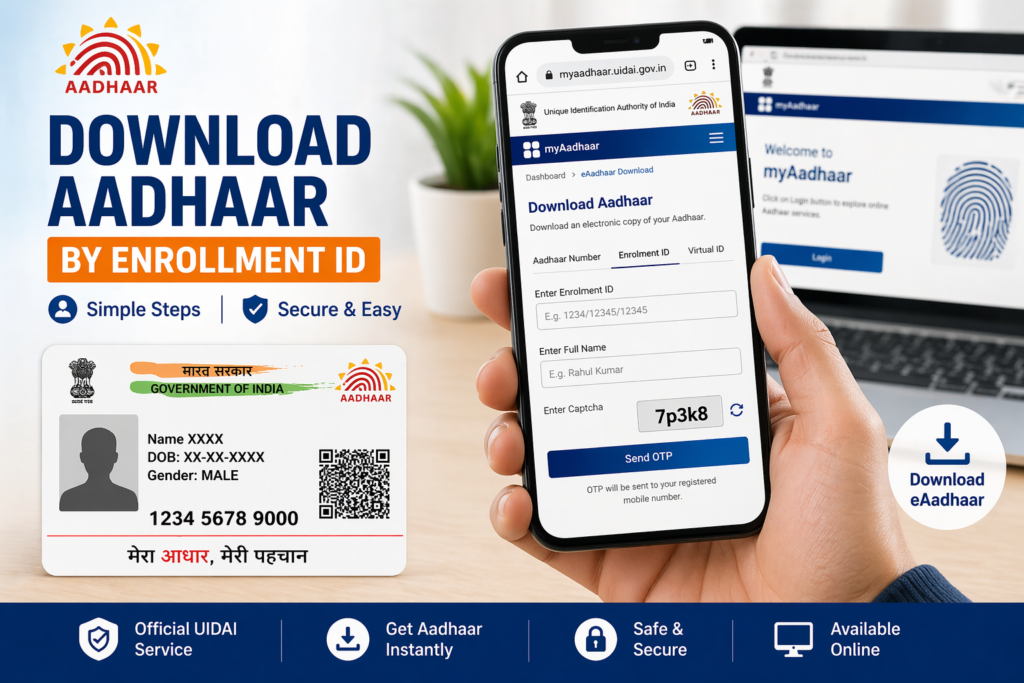
If you have lost your Aadhaar card or if your Aadhaar number is not available yet, you can still download the Aadhaar card online using the Enrollment ID.
This guide explains what the Aadhaar Enrollment ID is, where to find it, and how to download Aadhaar using EID step by step.
What is Aadhaar Enrollment ID (EID)
The Enrollment ID (EID) is a unique number assigned to every Aadhaar application at the time of enrollment. It is provided on the acknowledgement slip given after completing the Aadhaar registration process.
The EID helps UIDAI identify your Aadhaar application and track the progress of the enrollment request.
The Enrollment ID usually consists of:
- A 14-digit enrollment number
- A date and time stamp
Both of these together form the complete Enrollment ID.
This ID is important because it allows applicants to track their Aadhaar application and download the Aadhaar card once it is generated.
Where to Find Aadhaar Enrollment ID
The Enrollment ID can be found on the acknowledgement receipt provided after completing Aadhaar enrollment.
The receipt contains several details including:
- Enrollment ID (EID)
- Date and time of enrollment
- Name of the applicant
- Enrollment center details
Residents should keep this receipt safe until the Aadhaar number is generated.
If the receipt is lost, UIDAI provides options to retrieve the Enrollment ID through the official portal.
When You Need to Download Aadhaar Using Enrollment ID
Downloading Aadhaar using the Enrollment ID becomes useful in several situations.
For example, after applying for Aadhaar, residents may want to access the digital version of their Aadhaar card before receiving the physical card.
It is also helpful if the Aadhaar number is not yet known but the Aadhaar application has already been processed.
The Enrollment ID allows residents to download the Aadhaar card even without remembering the Aadhaar number.
Steps to Download Aadhaar by Enrollment ID
UIDAI provides a simple online process that allows residents to download their Aadhaar card using the Enrollment ID.
Step 1: Visit the UIDAI Website
Open the official UIDAI website using a secure internet connection.
Step 2: Go to Aadhaar Download Section
Navigate to the section where residents can download their Aadhaar card.
Step 3: Select Enrollment ID Option
Choose the option to download Aadhaar using the Enrollment ID.
Step 4: Enter Enrollment ID
Enter the 14-digit Enrollment ID along with the date and time mentioned on the acknowledgement receipt.
Step 5: Enter Security Code
Enter the captcha code displayed on the screen.
Step 6: Verify Using OTP
An OTP will be sent to the mobile number registered during Aadhaar enrollment.
Enter the OTP to verify the request.
Step 7: Download e-Aadhaar
After successful verification, the e-Aadhaar file will be available for download.
The Aadhaar card will be downloaded as a password-protected PDF.
Aadhaar PDF Password After Download
The e-Aadhaar file downloaded using Enrollment ID is protected with a password.
The password format is:
First four letters of your name in capital letters + year of birth
For example:
If the name is Anita Sharma and the year of birth is 1995, the password will be:
ANIT1995
Entering the correct password allows you to open the Aadhaar PDF file.
Benefits of Downloading Aadhaar Online
Downloading Aadhaar online provides several advantages for residents.
Quick Access
Residents can download the Aadhaar card instantly once it is generated.
Digital Convenience
The e-Aadhaar can be stored on mobile devices or computers for easy access.
Legally Valid
The e-Aadhaar document is digitally signed by UIDAI and is accepted as valid identity proof.
Useful Before Physical Delivery
Residents can use the digital Aadhaar even before receiving the physical card.
These advantages make downloading Aadhaar online a convenient option.
What to Do if Aadhaar Is Not Yet Generated
If the Aadhaar number has not yet been generated, the system may display a message indicating that the Aadhaar is still under processing.
In such cases, residents should wait until UIDAI completes the verification process.
Applicants can check the Aadhaar enrollment status using the Enrollment ID to confirm whether the Aadhaar number has been generated.
Once the Aadhaar is ready, the e-Aadhaar download option becomes available.
How Long Aadhaar Generation Takes
The time required to generate an Aadhaar number may vary depending on verification procedures.
UIDAI verifies the demographic information and biometric details submitted during enrollment before generating the Aadhaar number.
In many cases, the process may take a few days or weeks.
Residents can check the Aadhaar status online to monitor the progress of their application.
What to Do If Enrollment Receipt Is Lost
If the Aadhaar enrollment receipt containing the Enrollment ID is lost, residents can retrieve the Enrollment ID through the UIDAI website.
The UIDAI portal provides a facility to recover the Enrollment ID using details such as name and registered mobile number.
Once the Enrollment ID is retrieved, residents can use it to download their Aadhaar card.
Keeping Aadhaar details updated and storing important information safely helps avoid such issues.
Tips for Downloading Aadhaar by Enrollment ID
Residents can make the download process easier by following a few simple tips.
Ensure that the Enrollment ID and timestamp are entered exactly as mentioned on the acknowledgement receipt.
Keep the mobile phone with the registered number nearby because OTP verification is required.
After downloading the Aadhaar PDF file, store it safely and avoid sharing it with unknown individuals.
These precautions help ensure that Aadhaar information remains secure.
Related Aadhaar Services
After downloading the Aadhaar card, residents may also use other Aadhaar services such as:
- Update Aadhaar address
- Check Aadhaar update status
- Order PVC Aadhaar card
- Lock or unlock Aadhaar biometrics
- Download Aadhaar using Aadhaar number
These services help residents manage their Aadhaar information conveniently.
Frequently Asked Questions
Can I download Aadhaar without Aadhaar number
Yes, Aadhaar can be downloaded using the Enrollment ID provided during Aadhaar enrollment.
What is Enrollment ID in Aadhaar
The Enrollment ID is a unique number assigned to an Aadhaar application at the time of enrollment.
Is e-Aadhaar valid as Aadhaar card
Yes, e-Aadhaar is digitally signed by UIDAI and is accepted as valid identity proof.
How can I retrieve lost Enrollment ID
You can retrieve the Enrollment ID from the UIDAI website using your registered mobile number.
Conclusion
The Enrollment ID plays an important role in the Aadhaar enrollment process because it allows residents to track their application and download their Aadhaar card online. Even if the Aadhaar number is not available, the Enrollment ID can be used to access the digital version of the Aadhaar card once it is generated.
Downloading Aadhaar by Enrollment ID is simple and convenient. By entering the correct EID and completing OTP verification, residents can quickly download the e-Aadhaar and use it for identity verification.
Keeping the Enrollment ID safe and monitoring the Aadhaar application status helps ensure that residents can access their Aadhaar card without difficulty.