

With the increasing use of smartphones, many government services in India are now accessible through mobile applications. To make Aadhaar services easier and more convenient for residents, the Unique Identification Authority of India (UIDAI) introduced the mAadhaar mobile application.
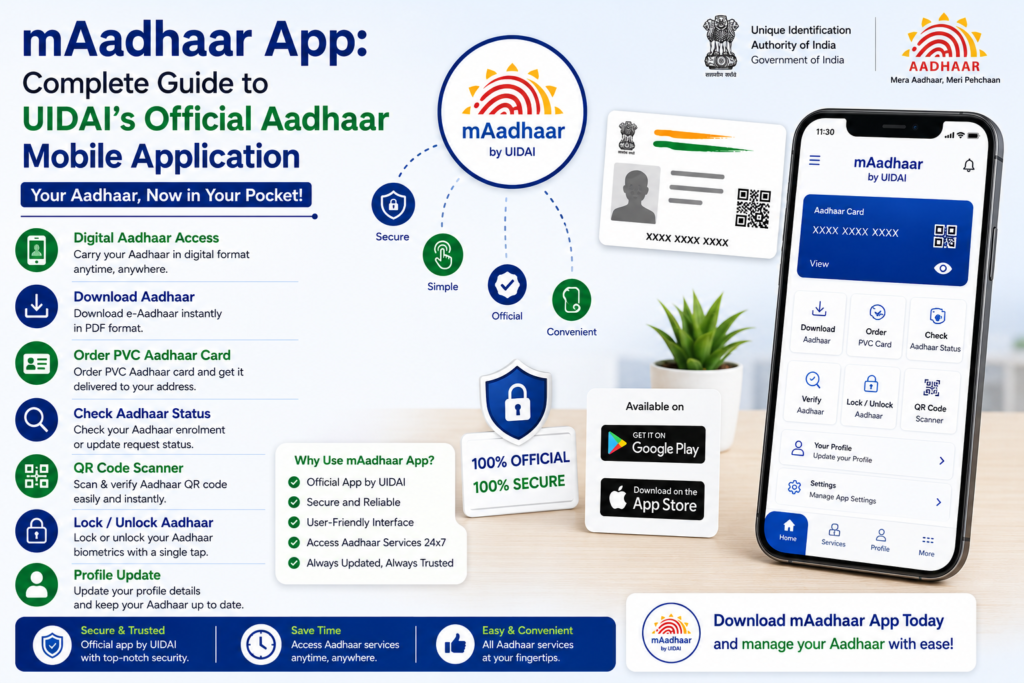
The mAadhaar app allows Aadhaar holders to carry their Aadhaar details on their mobile phones and access several Aadhaar services without needing the physical Aadhaar card.
Through this mobile application, users can view their Aadhaar profile, generate virtual IDs, lock or unlock biometrics, and perform several Aadhaar-related tasks.
This guide explains what the mAadhaar app is, its features, how to download it, and how residents can use it to manage their Aadhaar information.
What is the mAadhaar App
The mAadhaar app is the official mobile application developed by UIDAI for Aadhaar services. The application allows residents to access Aadhaar information directly from their smartphones.
With this app, Aadhaar holders can store their Aadhaar profile on their device and use it whenever identity verification is required.
The application is designed to make Aadhaar services more accessible and convenient while maintaining security and privacy.
Instead of carrying a printed Aadhaar card everywhere, residents can simply use the digital Aadhaar stored in the mAadhaar app.
Purpose of the mAadhaar App
The main objective of the mAadhaar app is to simplify Aadhaar services and allow residents to manage their Aadhaar identity through mobile devices.
The app provides a secure platform where Aadhaar holders can access their details and perform basic Aadhaar services without visiting an Aadhaar enrollment center.
It also helps residents carry Aadhaar information digitally, reducing the need to carry physical documents.
The application combines convenience with security, making Aadhaar services easier to access.
Key Features of the mAadhaar App
The mAadhaar application offers several useful features for Aadhaar holders.
Aadhaar Profile on Mobile
Users can store their Aadhaar profile securely on the mobile phone and access it whenever required.
Virtual ID Generation
The app allows users to generate and manage their Aadhaar Virtual ID for authentication.
Biometric Lock and Unlock
Residents can lock or unlock Aadhaar biometrics directly through the application.
Aadhaar QR Code Sharing
The app provides the option to share Aadhaar information using a secure QR code.
Address Update Request
Some Aadhaar update services can be initiated through the application.
Aadhaar Authentication
Users can perform Aadhaar authentication using their mobile device.
These features make the mAadhaar app a useful tool for managing Aadhaar services.
How to Download the mAadhaar App
Downloading the mAadhaar app is simple and can be done through official mobile app stores.
Residents should ensure that they download the application from trusted sources to avoid fake apps.
Steps to Download mAadhaar
- Open the app store on your smartphone.
- Search for mAadhaar in the search bar.
- Look for the official app published by UIDAI.
- Tap the install button to download the application.
- Wait for the installation to complete.
After installation, the app can be opened and configured.
How to Set Up mAadhaar App
After downloading the mAadhaar application, residents need to set it up before using its features.
The setup process includes verifying the mobile number linked with Aadhaar.
Step 1: Open the App
Launch the mAadhaar application on your mobile device.
Step 2: Create App Password
The application may ask you to create a password or security PIN for accessing the app.
Step 3: Register Mobile Number
Enter the mobile number that is registered with Aadhaar.
Step 4: Verify Using OTP
An OTP will be sent to the registered mobile number. Enter the OTP to verify the account.
Step 5: Add Aadhaar Profile
After verification, you can add your Aadhaar profile to the application.
Once the profile is added, Aadhaar details can be accessed through the app.
How to Use mAadhaar App
After setting up the application, residents can use the app for several Aadhaar services.
View Aadhaar Profile
The app allows users to view their Aadhaar details including name, photograph, and Aadhaar number.
Share Aadhaar QR Code
Users can share Aadhaar information using the secure QR code feature.
Generate Virtual ID
Virtual ID can be generated and used for Aadhaar authentication.
Lock or Unlock Biometrics
Biometric authentication can be controlled directly through the app.
These features make Aadhaar services easily accessible from a smartphone.
Advantages of Using mAadhaar App
Using the mAadhaar app offers several benefits to Aadhaar holders.
Convenience
Residents can access Aadhaar information anytime using their mobile device.
Digital Identity
The app allows users to carry Aadhaar digitally instead of carrying the physical card.
Security
The application includes password protection and OTP verification.
Quick Access to Services
Several Aadhaar services can be accessed quickly through the app.
These advantages make the mAadhaar app a practical tool for managing Aadhaar services.
Is mAadhaar App Safe to Use
The mAadhaar application is developed by UIDAI and designed with security features to protect user information.
The app uses secure login methods, OTP verification, and encrypted communication to protect Aadhaar data.
Users should still follow basic safety practices such as downloading the app only from official app stores and avoiding sharing personal Aadhaar details with unknown sources.
Keeping the mobile device secure also helps protect Aadhaar information.
Common Issues While Using mAadhaar App
Although the mAadhaar app is easy to use, some users may experience certain issues.
OTP Not Received
Network issues may prevent OTP messages from arriving during the registration process.
Incorrect Mobile Number
If the mobile number entered is not linked with Aadhaar, the app cannot verify the user.
App Installation Problems
Some devices may face compatibility issues when installing the app.
Ensuring a stable internet connection and correct mobile number usually resolves these issues.
Tips for Using mAadhaar App Safely
Residents can make the most of the mAadhaar app by following a few simple precautions.
Always keep the app updated to the latest version. Avoid sharing Aadhaar details through unsecured platforms.
Set a strong password for the app and lock your mobile device with a screen lock or biometric security.
These precautions help protect Aadhaar information stored on the mobile device.
Related Aadhaar Services
Along with the mAadhaar app, residents can access several other Aadhaar services including:
- Download Aadhaar card
- Update Aadhaar details
- Check Aadhaar status
- Order PVC Aadhaar card
- Lock or unlock Aadhaar biometrics
These services help residents manage their Aadhaar identity efficiently.
Frequently Asked Questions
What is mAadhaar app
The mAadhaar app is the official mobile application developed by UIDAI for accessing Aadhaar services on smartphones.
Can Aadhaar be used through mAadhaar app
Yes, the app allows users to store and access their Aadhaar profile digitally.
Is the mAadhaar app free
Yes, the application can be downloaded and used free of cost.
Can multiple Aadhaar profiles be added in the app
Yes, the app allows adding multiple Aadhaar profiles within the same device.
Conclusion
The mAadhaar app provides a convenient and secure way for residents to access Aadhaar services through their smartphones. By storing Aadhaar details digitally, the app allows users to carry their Aadhaar identity without needing the physical card.
With features such as Aadhaar profile access, virtual ID generation, biometric control, and secure QR code sharing, the mAadhaar application simplifies many Aadhaar-related tasks.
Using the mAadhaar app responsibly and keeping Aadhaar details secure helps residents benefit from the convenience of digital identity services.